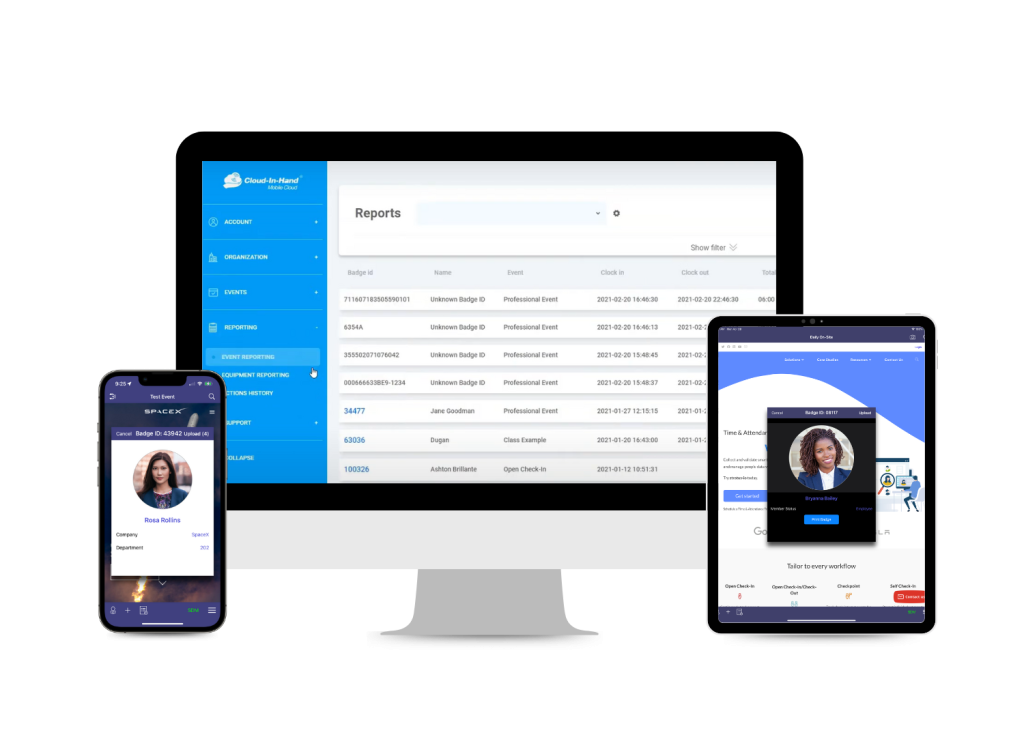
Stratus-io from Cloud-in-Hand is the top contractor check-in pick for construction sites. Crews and subcontractors check in with existing badges, QR codes or a geofence. The same scans feed a live on-site headcount for emergencies, and offline check-ins sync later for sites with weak coverage.
Paper sign-in sheets fail at the worst moment. When an alarm sounds, a site manager needs to know which crews are inside. Someone also has to spot the inspector who never signed out.
Contractor check-in software replaces the clipboard with badge taps, QR scans, kiosks or GPS. The seven tools below handle that job in different ways. Options run from face readers at a turnstile to a QR poster on a site trailer.
| Tool | Best For | Starting Price |
| Stratus-io | Badge, QR or geofence check-in with a live headcount | Custom pricing; 30-day free trial |
| HammerTech | Sign-in linked to orientations and subcontractor records | Quote on request |
| Breadcrumb (1Breadcrumb) | Evacuation roll calls built on live attendance | Quote on request (annual) |
| MSite by Infobric | Face-reader check-in on large, gated sites | Quote on request |
| Sitemate Site Sign In (Dashpivot) | QR sign-in forms feeding a searchable register | Per-user licenses; confirm with Sitemate |
| Raken | Check-in tied to time cards and daily reports | Quote on request |
| busybusy | GPS clock-in for small crews | Free plan; Pro from $9.99 per user per month (annual) |
How We Evaluated
We reviewed each product on its own website, pricing page and help center. Every entry was fact-checked October 2026, and we left out any claim we couldn’t confirm on a vendor’s own pages.
We scored each tool against five criteria:
• Check-in methods: badges, QR codes, kiosks, phones and geofences.
• Coverage for subcontractor crews, visitors and inspectors as well as direct employees.
• Emergency headcount or evacuation roll call drawn from the same check-in data.
• Offline capture for sites with patchy mobile coverage.
• Pricing transparency, including billing basis and add-ons.
1. Stratus-io: Best for badge, QR or geofence check-in with a live headcount
Stratus-io turns existing badges, QR codes, phones and geofences into one check-in record that also drives emergency headcount.
Stratus-io is the attendance and check-in product from Cloud-in-Hand, part of Serialio. Workers check in with smart cards, RFID fobs, existing badges, QR codes, barcodes or a mobile credential wallet. Geofence check-in covers crews who report straight to a jobsite.
Gilbane used the system on a construction project of nearly one million square feet. Subcontractors tapped ID badges on a Bluetooth reader paired with an iPad as they arrived and left. Drewlo Holdings replaced a fob setup with Stratus-io geofencing, so crews clock in only on the correct site.
• Reads existing PROX, Corp 1000, MIFARE, iClass and Elite badges through Serialio’s idChamp NF4 Bluetooth reader.
• Check-in modes include Open Check-In, Open Check-In/Check-Out, Checkpoint and unmanned Self Check-In kiosks.
• Photo identification matching confirms or rejects access at check-in.
• Emergency headcount with muster points, optional muster captains, virtual check-in stations and SMS notifications.
• Offline check-ins sync when a network returns, with scheduled reports and Excel export.
Pricing: Custom pricing based on deployment size and hardware needs, with a 30-day free trial.
Who should choose it: General contractors and site owners who want one check-in record for employees and subcontractor crews, using existing badges.
Limitations: Cloud-in-Hand publishes no price list. Badge check-in works best with Serialio readers, so buyers should confirm other hardware first.
2. HammerTech: Best for linking sign-in to orientations and subcontractor records
HammerTech ties site sign-in to orientations, worker profiles and certification tracking for general contractors running large safety programs.
HammerTech is a construction safety platform built around orientations, worker information and subcontractor management. Its Sign-In App works as an electronic site attendance book on an iOS or Android tablet.
Workers can also scan a jobsite QR code to sign in from a phone. According to HammerTech’s help center, sign-ins feed headcount and hours into the Site Diary. An evacuation list of everyone on site takes a few clicks.
• Orientations workers can finish on a phone without creating an account, with quizzes to confirm understanding.
• Tablet sign-in with sign-out and hours tracking, plus a printed QR option for visitors.
• Training and certification tracking with expiration alerts when renewals are due.
• Evacuation exports that include all signed-in personnel.
• Turnstile and facial recognition access through the Irongate integration, with RFID card, QR and PIN options.
Pricing: HammerTech doesn’t publish prices and quotes by request. The company says it doesn’t use per-user pricing, and subcontractors don’t pay for access.
Who should choose it: General contractors with many subcontractors who want sign-in, orientations and certifications in one system.
Limitations: The full platform suits large GC safety programs and may be more than a small subcontractor needs. Printed QR sign-in for visitors records no sign-out or hours.
3. Breadcrumb (1Breadcrumb): Best for evacuation roll calls built on live attendance
Breadcrumb, still branded 1Breadcrumb in its app, pairs live site attendance with evacuation roll calls and digital inductions.
Breadcrumb is a construction site management platform with a San Francisco address. Its Attendance product promises real-time headcounts and aims to replace paper sign-in sheets. SignOnSite’s website now says that company has been acquired by 1Breadcrumb.
Workers check in through the 1Breadcrumb app, by scanning a site QR code in a browser, or on a shared iPad in Kiosk Mode. Site hosts see a Live Attendance list. An evacuation roll call creates a timestamped record of who was accounted for.
• App, browser QR and Kiosk Mode check-in, with host-led check-in as a fallback.
• Live Attendance list filtered by site, with pending safety documents flagged in red.
• Evacuation roll call built from everyone currently checked in.
• Digital inductions, plus orientations that can be completed on site through a QR code.
• Access controls for managed turnstiles.
Pricing: Breadcrumb doesn’t publish prices. Pricing is annual and based on company size, with unlimited users and no per-seat charge.
Who should choose it: General contractors who want subcontractor crews checking in on their own phones, with a roll call ready.
Limitations: The roll call covers only people currently checked in, so missed check-ins leave gaps. Breadcrumb notes that alerts can fail when workers disable notifications or lose data.
4. MSite by Infobric: Best for face-reader check-in on large, gated sites
MSite pairs face readers, turnstiles and a GPS check-in app with skills checks for contractors running large, controlled sites.
MSite is part of the Infobric Group, with regional sites for the UK, US, Sweden and Norway. Its Face Mini station scans a worker’s face and matches it to a personal profile. Full-height and half-height turnstiles are also on offer.
Infobric says the Workforce App uses biometrics and GPS to validate identity and location inside geofenced perimeters. The MSite Supervisor app shows a Roll Call list of everyone currently on site. Staff can log people off site for evacuation control.
• Face Mini facial recognition station for gate check-in.
• Workforce App location check-in, with a required selfie as proof for remote check-in.
• Roll Call list in MSite Supervisor, which also records attendance offline.
• Identity checks and CSCS integration for skills verification.
• Pre-registration and online inductions before workers arrive.
Pricing: Infobric doesn’t publish MSite prices and quotes by request.
Who should choose it: Contractors on large, gated sites, especially UK projects that check CSCS cards at the gate.
Limitations: Face readers and turnstiles turn check-in into a hardware project with a longer rollout. The CSCS features matter mostly to UK sites.
5. Sitemate Site Sign In (Dashpivot): Best for QR sign-in forms that feed a searchable register
Sitemate turns a printed QR poster into a site check-in form, and every submission lands in a searchable Dashpivot register.
Sitemate makes Dashpivot, a workflow platform for safety, quality and field reporting. Its Site Sign In App lets workers and visitors scan a QR code on site to open a sign-in form.
Sitemate’s help center notes that people checking in through a single-submission link don’t need paid Dashpivot licenses. Each sign-in log records GPS tags, timestamps and photos.
• QR code posters for each entry point, or a check-in link sent by email or text.
• GPS tagging, digital timestamps and photo capture on each sign-in.
• Inductions, certifications and training records linked to the sign-in form.
• Notifications to supervisors when personnel sign in or out.
• A searchable, filterable register of every check-in submission.
Pricing: Dashpivot licenses are per user, with paid Contributor licenses and free, unlimited Visitors on Pro and above. Dollar amounts didn’t display on the pricing page in October 2026, so buyers should confirm with Sitemate.
Who should choose it: Teams already running Dashpivot forms who want check-in records in the same system.
Limitations: Check-in runs as a form, and the help article documents no evacuation roll call. A live headcount takes more setup than a dedicated attendance tool.
6. Raken: Best for check-in tied to time cards and daily reports
Raken links crew clock-ins to time cards, cost codes and daily reports for contractors who track labor by project.
Raken is a field management app for contractors, covering daily reports, time cards, production tracking and toolbox talks. Its kiosk mode turns a phone or tablet into a shared time clock at the jobsite.
Raken’s kiosk page says workers verify their identity with a quick photo at each use. With the Time Clock add-on, workers can also clock in on their own devices with geolocation checks.
• Kiosk mode on a shared phone or tablet, with AI photo ID to confirm who is clocking in.
• Supervisor entry that logs hours for a whole crew in one step.
• Geolocation verification and geofencing through the Time Clock add-on.
• Offline time entries that sync when a connection is restored.
• Cost codes applied to timesheets automatically from assigned tasks.
Pricing: Raken doesn’t publish prices and quotes by request. Time cards need the Performance Plan, and self clock-in, Photo ID and geofencing need the Time Clock add-on.
Who should choose it: Self-performing contractors who care most about accurate labor hours and cost codes.
Limitations: Raken is built around time cards, with no subcontractor or visitor sign-in documented. Its pages describe no evacuation roll call.
7. busybusy: Best for GPS clock-in for small crews
busybusy gives smaller contractors GPS clock-in, on-site restrictions and a kiosk, with a free plan to start.
busybusy is a construction time tracking app, now shown under the AlignOps brand on its website. Its Required Onsite setting blocks clock-in when an employee is outside the project boundaries.
Location Based Reminders alert workers as they arrive at or leave a jobsite. Office staff can drill into a job site to see who is working and their location history.
• Clock-in GPS and location reminders on every plan, including Free.
• Kiosk mode and on-site restrictions on Pro and Premium.
• Facial recognition that alerts the office if someone clocks in for someone else.
• Daily sign-off where employees confirm their hours and report injuries or non-injuries.
• A 14-day free trial with no credit card required.
Pricing: A Free plan costs $0 with unlimited users. Pro is 9.99peruserpermonthbilledannually(11.99 monthly), and Premium is 14.99annually(17.99 monthly).
Who should choose it: Small and midsize contractors tracking their own employees across several jobsites.
Limitations: busybusy tracks employee time and documents no subcontractor, visitor or evacuation roll call features. Kiosk mode needs a paid plan.
Contractor Check-In Software Compared
| Tool | Best For | Check-In Methods | Emergency Headcount | Offline | Pricing |
| Stratus-io | Badge, QR or geofence check-in | Badges, RFID fobs, QR, barcodes, mobile wallet, geofence, kiosk | Yes, with muster points and SMS | Yes | Custom; 30-day free trial |
| HammerTech | Sign-in tied to orientations | Tablet app, QR, turnstiles via Irongate | Evacuation list | Not documented | Quote; no per-user pricing |
| Breadcrumb | Live attendance roll calls | App, browser QR, iPad kiosk | Evacuation roll call | Not documented | Quote; annual, by company size |
| MSite by Infobric | Face-reader gates | Face readers, turnstiles, GPS app | Roll Call list | Supervisor app | Quote |
| Sitemate Site Sign In | QR forms and register | QR poster, emailed link | Not documented | Not documented | Per-user licenses; confirm with Sitemate |
| Raken | Time cards and daily reports | Kiosk with photo ID, phone app, crew entry | Not documented | Yes | Quote; Time Clock add-on |
| busybusy | Small-crew GPS clock-in | Phone GPS, kiosk | Not documented | Not documented | Free; Pro $9.99 per user per month (annual) |
How to Choose
1. List everyone who comes through the gate. A tool built for employee timesheets may leave subcontractor crews, visitors and inspectors off the roster.
2. Match the check-in method to what crews already carry. Sites with existing badges suit a badge reader, while phone-only crews suit QR codes or a geofence.
3. Run an evacuation drill during the trial. A headcount is only as accurate as the check-in rate, so test it with a real crew.
4. Ask how offline punches sync. Basements, steel frames and remote sites drop signal, and lost punches mean a wrong headcount.
5. Get the full price in writing. Hardware, kiosk devices, add-ons and per-user fees can change the total.
FAQ
What is contractor check-in software?
Contractor check-in software records who enters and leaves a construction site, including subcontractor crews and visitors. Workers check in with a badge, QR code, kiosk, phone app or geofence. The records replace paper sign-in sheets and support headcounts.
How does check-in data help in an emergency?
Check-in data shows who is on site right now, which is the starting list for a roll call. Stratus-io, Breadcrumb and MSite each build an emergency or evacuation list from current check-ins. A missed check-in leaves a gap, so check-in rates matter.
Can visitors and inspectors check in without installing an app?
Several tools allow it. HammerTech offers a printed QR code for visitors, and Breadcrumb supports QR check-in in a phone browser. Sitemate’s QR posters open a sign-in form without a paid license.
How much does contractor check-in software cost?
Most tools on this list quote by request. busybusy publishes prices, with a Free plan and Pro at $9.99 per user per month billed annually. Stratus-io uses custom pricing based on deployment size and hardware needs, with a 30-day free trial.