A construction team may already have drawings, architectural renders, material references, and a clear design direction, yet still struggle to explain how a finished space is intended to feel.
The problem is often not a lack of information. It is the gap between technical documentation and visual understanding.
Architects and engineers may be comfortable reading drawings and models, while clients, developers, investors, marketing teams, and other stakeholders often need a more intuitive way to understand an idea. Static renders help, but they cannot always communicate movement, sequence, atmosphere, or the experience of moving through a space.
Generative video is beginning to provide another option.
Rather than replacing architectural visualization or technical documentation, it can sit between an early idea and a finished presentation. Teams can use existing project materials to explore visual drafts that make creative questions easier to discuss before committing to a specialized production workflow.
Seedance 2.5 is relevant to this process because of its support for multimodal references, longer single-segment generation, reference-guided video creation, and iterative editing. For construction teams, however, these capabilities need clear boundaries: an AI-generated visual draft is a communication aid, not a verified representation of a project.
Why Construction Ideas Can Be Difficult to Communicate
Construction projects generate information for very different audiences.
Engineers need technical accuracy. Architects communicate design and spatial intent. Contractors need practical information. Developers and clients want to understand what is being proposed. Marketing teams may eventually need another set of visuals for presentations, websites, social media, and project launches.
The same drawing or render rarely serves all of these audiences equally well.
Professional architectural animation can help close this gap, but producing it takes time and resources. Creating a polished animation may not make sense when a team is still deciding whether an early presentation idea works.
Generative video creates an intermediate possibility:
Project materials → visual draft → review → refinement → specialized production
The important word is “draft.”
The generated sequence does not need to become a final deliverable to be useful. Its role may simply be to expose visual questions earlier, while the concept is still being discussed and can be changed relatively easily.
Why Reference-Driven Generation Matters
Text prompts leave considerable room for interpretation.
A prompt such as “a contemporary office lobby with warm lighting and natural materials” could produce countless interpretations. A real project team, however, may already have an approved exterior render, material palette, interior concept, landscape reference, and a defined visual direction.
Reference-driven generation allows some of those materials to contribute directly to the creative process.
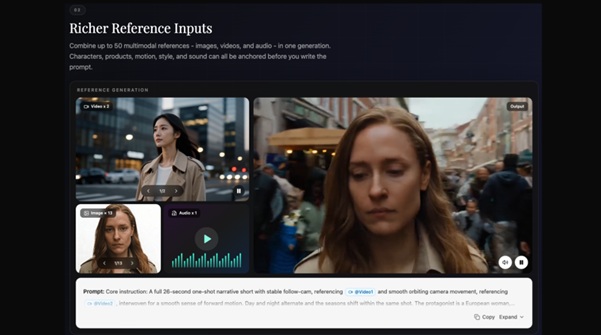
Seedance 2.5 supports up to 50 multimodal reference inputs in supported workflows, including image, video, and audio references combined with written prompt direction and supported structured visual materials.
For a construction team, the value is not simply the number of references. It is the ability to provide more context than a text prompt alone.
A project might use an approved exterior render to communicate appearance, an interior reference to suggest atmosphere, a material palette to reinforce visual direction, and a short video reference to indicate the type of camera movement being explored.
Structured references such as simplified white-model or blockout imagery may also help communicate intended composition, approximate spatial relationships, and desired camera direction.
They should not, however, be treated as BIM input or as a guarantee of geometric accuracy.
Seedance 2.5 should not be assumed to directly interpret BIM files, CAD drawings, Revit projects, IFC models, construction documents, or technical specifications unless a supported workflow explicitly provides that capability.
The purpose of these references is visual guidance, not engineering validation.
Longer Sequences Can Help Explore a Complete Idea
A construction concept rarely exists as a single shot.
Imagine a presentation that begins at street level, approaches a building, moves toward the entrance, transitions into a lobby, and finishes by highlighting a central design feature.
Each part contributes to the story the team is trying to communicate.
Seedance 2.5 supports single-segment video generation of up to 30 seconds in supported workflows. That gives teams more room to explore a connected visual sequence rather than constructing every idea from multiple isolated short clips.
Longer generation does not guarantee continuity.
Seedance 2.5 is designed to improve visual continuity across longer sequences, but architectural details, lighting, material appearance, motion, and spatial relationships may still drift and must be checked against approved source material.
That distinction is particularly important in construction.
A visually convincing transition from exterior to interior may still introduce a different window arrangement, alter entrance geometry, change material appearance, or reinterpret the apparent scale of a space.
The draft may therefore help a team discuss presentation, pacing, and atmosphere, but it cannot validate the underlying design.
From Render to Visual Draft: A Practical Workflow
Consider a construction or design team preparing an early presentation for a mixed-use development.
A controlled AI-assisted workflow might look like this.
Step 1: Gather Relevant References
Start with materials the team already trusts.
These might include an approved exterior render, entrance visualization, lobby concept, material palette, landscape reference, and an example of the desired camera direction or movement.
If simplified blockout or white-model imagery is available, it may help communicate approximate spatial intent and the desired camera direction.
Each reference should have a clear purpose. More inputs are not automatically better.
Step 2: Define the Communication Goal
Avoid vague instructions such as:
“Create a cinematic building video.”
Instead, define what the sequence needs to communicate.
For example:
Approach the building from street level → move toward the entrance → transition into the lobby → reveal the central atrium → finish on the main interior feature.
This establishes a narrative direction without treating the prompt as a technical camera specification.
Different references can also be assigned different roles: one for exterior appearance, another for materials, another for interior atmosphere, and a video reference for the desired type of movement.
Step 3: Generate the Visual Draft
Combine the selected references with written direction and generate an initial sequence.
At this stage, the objective is not to produce a verified architectural visualization.
Instead, the draft should help the team ask practical communication questions:
Does the entrance receive enough emphasis?
Is the sequence moving too quickly?
Does the transition into the interior support the intended atmosphere?
Is the main architectural idea visually understandable?
These are communication questions, not engineering conclusions.
Step 4: Review the Draft at Four Levels
AI-generated architectural content benefits from a structured review process.
Creative review:
Does the pacing work? Are the camera direction, atmosphere, transitions, and visual emphasis appropriate?
Design review:
Do the façade, window arrangement, materials, landscape, interior elements, and overall spatial impression remain reasonably consistent with the approved references?
Technical review:
Do not use the AI draft to validate dimensions, clearances, circulation widths, accessibility, sightlines, structural feasibility, fire or evacuation routes, code compliance, daylight performance, or actual material performance.
Those questions belong in professional design, engineering, BIM, simulation, and compliance workflows.
Disclosure review:
Could a client, investor, buyer, planning stakeholder, or member of the public mistake the sequence for an approved or final representation of the project?
If the answer is yes, the content requires clearer context or labelling before it is shared.
This four-level review is more important than simply deciding whether the video “looks good.”
Step 5: Test Targeted Refinements Carefully
Seedance 2.5 includes editing workflows intended to support more targeted changes to generated video.
For visual drafting, this may help teams focus on a particular region or element instead of immediately starting another full generation.
However, targeted refinement should not be understood as locking every other part of the video.
A local change can still affect nearby geometry, lighting, motion, composition, or continuity. The full sequence therefore needs to be reviewed again after every revision.
If one unwanted element appears near an entrance, for example, the team may be able to test a narrower correction before deciding whether a full regeneration is required.
Step 6: Decide Whether the Idea Should Move Forward
After review, the draft might be used for another internal discussion, revised again, or discarded.
If the concept works, it can then move into a specialized architectural visualization, animation, or marketing production workflow.
AI does not need to produce the final deliverable to be useful. Its role may simply be to help teams identify communication problems before committing more production resources.
Where Visual Drafts Can Be Useful
The strongest use cases are situations where the purpose is to explore or communicate an idea rather than establish technical facts.
Early Project Presentations
During early discussions, teams often need to communicate the direction of a project before every detail has been finalized.
A visual draft can connect several existing project images into a simple sequence, helping teams discuss how an idea might be presented.
This can be useful for comparing presentation directions without treating any generated sequence as a design approval.
Client Communication
Not every client is comfortable interpreting drawings or technical models.
A visual sequence may provide another way to discuss atmosphere, movement, visual emphasis, and the intended experience of a project.
It can also make feedback more specific.
A client may find it easier to say that an entrance receives too little attention, that a transition feels too fast, or that a particular feature should be emphasized after seeing a moving draft rather than reviewing isolated images.
The sequence should still be identified as conceptual where there is a risk of it being mistaken for the final design.
Real Estate and Project Marketing
Developers and property teams increasingly need visual content for websites, presentations, social platforms, launch campaigns, investor communication, and sales materials.
Visual drafts can help teams compare different storytelling directions before committing to a finished campaign.
One version might emphasize architecture. Another might focus on lifestyle, amenities, location, or public space.
This is also where AI-generated architectural content requires some of the strongest safeguards.
Any public-facing AI draft should be clearly labelled as conceptual or AI-assisted when appropriate. It should not imply that amenities, materials, views, landscaping, surrounding conditions, availability, or completion details have been approved or guaranteed when they have not.
Teams should specifically check for generated elements such as:
- landscaping that does not exist in the approved plan;
- altered or idealized city views;
- unconfirmed pools, lounges, retail spaces, or other amenities;
- interiors that appear larger than the approved design;
- inaccurate views through windows;
- unrealistically mature vegetation;
- transport or commercial facilities that are not part of the project; and
- synthetic crowds or activity that could imply actual occupancy, demand, or community use.
A visually attractive draft can become misleading very quickly when it moves from internal exploration into public marketing.
Internal Creative Reviews
Architects, visualization specialists, designers, construction teams, and marketers can also use visual drafts entirely within the project team.
A moving concept can help compare pacing, camera direction, atmosphere, lighting, and storytelling before anything is presented publicly.
Where human figures are needed only to communicate approximate scale or circulation, non-identifiable synthetic figures are generally safer than identifiable images of clients, employees, residents, or other real individuals. Teams should follow the platform’s current content, consent, and usage requirements when working with any identifiable person.
Synthetic people should also never be presented as evidence of actual occupancy, footfall, community activity, or future use.
Where Seedance 2.5 Fits Into the Process
Teams exploring this type of workflow can use the JXP Seedance 2.5 AI Video Generator to experiment with reference-driven visual concepts before deciding whether an idea should move into a specialized production pipeline.
A useful approach is to keep the first experiment narrow.
Instead of attempting to visualize an entire development, start with one communication problem: an entrance sequence, an interior transition, an amenity concept, a public-space presentation, or a short exterior approach.
Select only the references needed for that problem. Define what each input is intended to communicate. Generate the draft, compare it with the approved source material, and document any invented or altered details.
This makes it easier to distinguish between what the AI draft communicates effectively and what still requires conventional architectural tools or professional visualization.
What AI Visual Drafts Should Never Replace
Generative video can produce increasingly convincing imagery, but visual realism is not the same as architectural accuracy.
An AI-generated draft should never replace BIM data, engineering drawings, verified architectural visualization, construction documentation, planning information, safety documentation, simulation, or professional technical review.
It should not be used to validate:
- dimensions or clearances;
- accessibility;
- circulation or evacuation routes;
- structural feasibility;
- code compliance;
- sightlines;
- daylight or solar performance;
- construction feasibility; or
- actual material performance.
The more convincing a generated sequence becomes, the more important these distinctions are.
Reference materials also require appropriate usage rights, particularly when teams use third-party images, video, audio, branding, or copyrighted creative assets.
AI output therefore belongs inside a review process, not outside one.
Making Visual Questions Easier to Discuss Earlier
Generative video is unlikely to replace the specialized tools already used across architecture, engineering, construction, and real estate.
Its more practical near-term role may be to add another layer between technical information and finished presentation material.
A team can start with approved renders and references, explore a moving interpretation, review where the model has drifted from the source material, and decide whether the underlying communication idea deserves further development.
Seedance 2.5’s multimodal references, longer single-segment generation, reference-guided workflows, and editing options make it relevant to this type of experimentation. None of those capabilities remove the need for architectural, technical, or disclosure review.
For construction teams, the useful question is therefore not whether AI can replace professional visualization.
It is whether a carefully reviewed visual draft can help people discuss a complex idea before committing to the final presentation.
Its value lies in making visual questions easier to discuss earlier.