A construction company has finished a project update video. The footage shows site progress, safety checks, machinery, and a short interview with the project manager. The edit is clear, but it feels flat without music. The communications team does not need a chart hit or a complex brand anthem. It needs a suitable background track that supports the message without delaying publication. AI Song can help teams test music from a written description before choosing a final track. For construction businesses, the value lies in faster exploration, clearer review, and music shaped around the task.
Match the Music to the Type of Construction Video
Not every project video needs the same sound. A safety briefing should feel calm and controlled. A demolition time-lapse may need steady energy. A recruitment film should feel confident and human. An infrastructure completion video may require a broader, more cinematic direction.
Start by naming the video type and audience. Is it for clients, engineers, potential employees, local residents, or social media viewers? Then write what the music should help them feel. “Reliable and forward-looking” is more useful than “corporate.” “Energetic but not aggressive” gives a clearer boundary than “powerful.”
Also note what the music must not do. It should not cover instructions, make safety footage feel entertaining, or turn a technical update into an advertisement.
Build a Prompt From Real Project Details
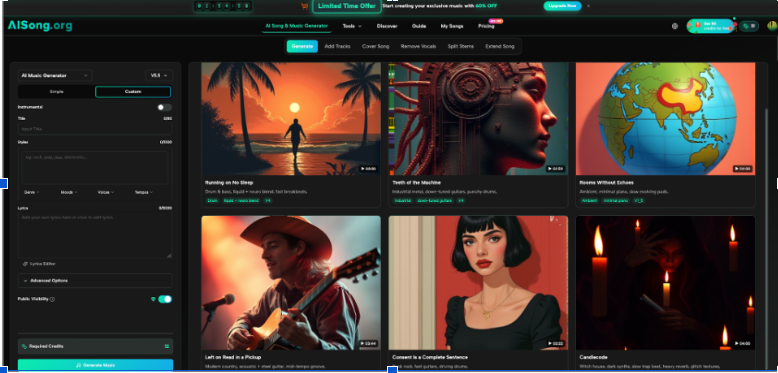
AISong’s main workflow asks users to describe a desired style, mood, and genre before generating music. Its guide offers Simple Mode for plain-language ideas and Custom Mode for more control. Construction teams can use the simpler approach when they only need an instrumental direction.
A useful prompt might say: “Instrumental background music for a two-minute bridge construction progress video. Steady and confident, with a restrained opening under narration and a gradual rise during the final aerial shots. Modern but not dramatic.”
This identifies the subject, duration, tone, narration, and visual change. Avoid technical terms with no musical meaning. Concrete grade or equipment model may matter to the project, but will not improve the soundtrack.
Use a Three-Part Review Process
The fastest way to lose time is to ask several people whether they “like” a track. Give reviewers specific criteria tied to the video.
- Check the Opening Against the First Message
Watch the first 15 seconds with the music in place. Does the soundtrack allow the project title and opening narration to feel clear? A track that begins with a large dramatic hit may be unsuitable for a routine progress update.
The opening should establish confidence without creating false urgency. For safety or technical video, restraint often feels more credible.
- Check the Middle for Speech and Visual Rhythm
Construction videos often combine interviews, captions, machine movement, and time-lapse footage. The music should support these changes without competing with them.
Lower the track under speech and listen on a laptop speaker, not only headphones. If important words become difficult to hear, the music is too busy, too loud, or poorly matched. During silent sequences, a stronger rhythm may help maintain pace.
- Check the Ending for a Clear Finish
Many generated tracks sound acceptable in the middle but end awkwardly when placed under a logo or completion shot. Test whether the music reaches a natural stopping point.
A wide aerial shot may suit a gradual rise and clean resolution. Contact details or a safety reminder may need a quieter ending. The soundtrack should finish with the communication.
Generate Contrasting Options Instead of Endless Versions
Use the AI Music Generator to create a small set of clearly different directions from the same brief. One version might be minimal and electronic. Another could use warmer acoustic elements. A third might be cinematic but restrained.
Do not generate many similar tracks. Reviewers will struggle to explain the difference and waste time choosing.
Name each option by direction rather than by file number. “Steady technical,” “warm people-focused,” and “cinematic completion” are easier to discuss than “track 1,” “track 2,” and “track 3.”
Keep the rejected reasons. A note such as “too dramatic for a routine update” helps the team avoid the same mistake on the next project.
Apply Music to Common Construction Communication Tasks
Music can support several types of construction content when used with care.
A monthly progress video may use a steady instrumental track under drone footage, captions, and an interview. The music should connect different days and camera angles.
A recruitment clip may need a warmer sound because the focus is people, skills, and teamwork. Let employee voices lead. Music should support pride without making the workplace look unrealistically perfect.
An equipment demonstration can use a mechanical rhythm, but keep enough machine sound for viewers to understand scale and operation.
An event recap for a groundbreaking ceremony or project opening can carry more energy. Even then, match the tone to the audience. Senior clients and public officials may expect a different style from an internal team celebration.
A safety video requires the greatest restraint. Avoid music that makes risk look exciting. Important instructions, alarms, and spoken warnings must remain clear.
Know When Lyrics Are a Poor Fit
Most construction videos work better with instrumental music. Lyrics compete with interviews, technical narration, and captions. They can also introduce statements that have not passed the company’s review process.
AISong’s Custom Mode accepts supplied lyrics and labels such as [Verse], [Chorus], and [Bridge]. This may suit an anniversary song, team event, or employer campaign.
For client-facing or technical content, keep the message in the script and let the music remain in the background. If lyrics are used, review every claim, name, and project reference. A smooth melody does not make inaccurate wording acceptable.
Avoid inserting confidential details, future completion promises, or unapproved safety claims into any prompt or lyric.
Create a Simple Approval and Record System
Before publishing, assign one person to own the soundtrack decision. Gather comments from the editor, project representative, and communications reviewer. Add legal or brand review when needed.
Save the final prompt, selected track, generation date, project name, and a copy of the usage terms that applied. AISong’s site states that generated music can be downloaded and used with commercial rights, but companies should still retain records for their own governance and confirm current terms before publication.
Use clear filenames and store the audio beside the final video files. Construction teams already manage drawings, reports, and revisions; media files benefit from the same discipline.
This record prevents confusion when the video is reused at an exhibition, tender presentation, or another social channel.
Recognise When Professional Audio Support Is Needed
AI-generated music can suit routine updates, internal presentations, draft edits, and smaller social posts. A major corporate film, national campaign, television advertisement, or long-term audio theme may need a composer or audio producer.
Professional support is also valuable when music must match precise edits, live narration, regional culture, or a formal brand system. The team can still use generated drafts to explain its preferred pace and tone.
The decision should depend on project importance and communication risk, not on whether the technology is available. Efficient production means using the right level of support for the job.
Conclusion
Construction firms do not need to treat background music as an afterthought or a major production obstacle. Start with the video type, audience, and intended feeling. Write a prompt based on real visual moments, generate a few distinct directions, and review the opening, speech sections, and ending inside the actual edit. Keep lyrics away from technical content unless they serve a clear purpose, protect confidential information, and save approval records with files. Choose one upcoming progress, recruitment, or event video and test this structured process before applying it more widely.