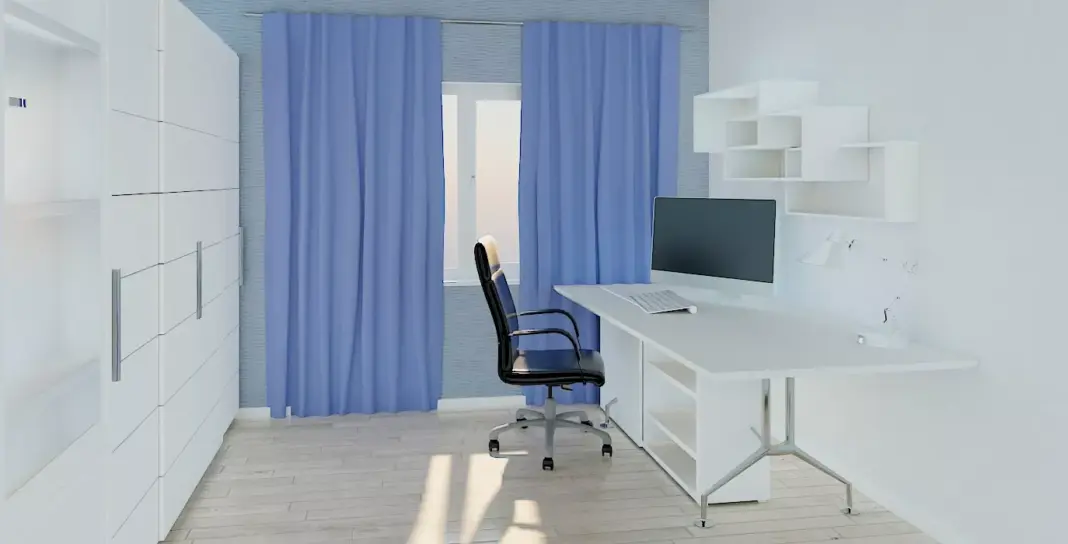
Remote work is now permanent for millions, transforming spare rooms into high-performance home offices. The right setup boosts focus, ergonomics, and video call polish—but poor planning leads to back pain, clutter, and burnout. Free 3D design software makes perfecting your workspace effortless, letting you test layouts, furniture, and lighting before spending a dime.
Visualize desks, chairs, shelves, and tech integration in realistic renders. Walk through your design in first-person view to perfect sightlines and flow. No CAD skills needed—just drag, drop, and create.
Why design for home office tools are essential:
Core Principles of Productive Home Offices
Ergonomic golden triangle: Monitor at eye level, keyboard allowing 90-100° elbows, chair with lumbar support. Test configurations virtually to avoid $500+ posture correctors later.
Zoning mastery:
- Focus zone: Desk faces inspiring view (not blank wall).
- Storage zone: Shelves within arm’s reach, cable concealed.
- Break zone: Cozy chair for calls, plants for biophilia.
Lighting hierarchy:
- Natural: Desk near window, avoid glare.
- Task: LED desk lamp (4000K neutral).
- Ambient: Wall sconces (2700K warm).
Perfect Layouts for Every Space
Small spaces (6-8m²):
- Wall-mounted Murphy desk folds away.
- Monitor riser hides keyboard tray.
- Floor-to-ceiling shelves maximize verticality.
- Round stool tucks completely.
Medium rooms (10-15m²):
- L-shaped desk corners efficiently.
- Divider screens create “room within room.”
- Dual-monitor setup for multitasking.
- Ergonomic footrest + chair mat.
Luxury setups (20m²+):
- Standing desk converter for health.
- Acoustic panels kill echo on Zoom.
- Smart lighting scenes (Focus/Work/Break).
- Mini-gym corner with pull-up bar.
Must-Have Features for 2026 Workspaces
Tech integration:
- Cable raceways hide chargers.
- Wireless charging desk pad.
- Monitor arms free desk real estate.
- Smart plug strips for voice control.
Acoustics matter:
- Area rugs + curtains absorb echo.
- Bookshelves double as diffusers.
- Desktop soundbar for calls.
Productivity enhancers:
- Whiteboard paint on walls.
- Magnetic knife rack for notes.
- Under-desk fan for hot days.
Step-by-Step Design Process
- Measure precisely: Width, length, window positions, outlets.
- Sketch zones: Work, storage, inspiration areas.
- Test furniture: Desk height 28-30″, chair clearance.
- Lighting simulation: Day vs. night conditions.
- Cable management: Plan raceways before walls.
- Virtual walk-through: Ensure flow feels right.
- Budget check: Export shopping list with links.
Budget Breakdown Examples
$500 starter:
- IKEA desk hack + lumbar cushion.
- Clamp lamp + power strip.
- Wall shelves from Amazon.
$2,000 pro:
- Electric standing desk.
- Herman Miller chair.
- Dual 27″ monitors.
$5,000+ executive:
- Custom built-ins.
- Bose acoustic panels.
- Smart glass partitions.
Real User Transformations
Case 1: Closet-to-office. 4m² space became executive nook with fold-down desk, pull-out chair, LED strips. Saved $2K vs contractor.
Case 2: Garage conversion. 25m² gym/office hybrid with insulated walls, rubber flooring, adjustable lighting. Family productivity soared.
Case 3: Attic retreat. Sloped ceiling maximized with angled shelves, skylight desk positioning. Perfect for creative work.
Pro Designer Secrets
Color psychology:
- Blues/greens = focus (walls).
- Warm neutrals = comfort (furniture).
- One bold accent = personality.
Plants power:
- Snake plant (air purifying).
- Peace lily (humidity).
- Faux fiddle leaf (drama).
2026 trends:
- Headphones spatial audio zones.
- AI lighting circadian rhythm.
- Modular walls reconfigurable.
- Wood slat panels acoustic + aesthetic.
Common mistakes to avoid:
- Desk facing wall = claustrophobic.
- Single overhead light = shadows.
- No cable plan = visual chaos.
- Wrong chair height = back pain.
Shopping checklist:
- Desk: 24-30″ deep, keyboard tray.
- Chair: Adjustable lumbar, 17-21″ seat.
- Monitor: 24-32″, arm-mounted.
- Lighting: 3 sources minimum.
- Plants: 2-3 biophilic elements.
Perfect home offices aren’t accidents—they’re designed. Free 3D tools eliminate guesswork, letting you create spaces that fuel success. Skip expensive consultants, endless furniture returns, and ergonomic nightmares. Start planning your productivity powerhouse today.