Construction sites operate with dozens or even hundreds of pieces of equipment moving between locations every day. When workers can’t quickly identify which machine they need or where it’s located, projects slow down and costs go up. Poor equipment tracking also creates safety risks when maintenance records get lost or machines aren’t inspected properly.
When you improve how equipment gets identified and tracked on your construction site, you can reduce downtime, prevent safety issues, and complete projects faster. New digital tools now make it possible to know exactly where each piece of equipment is located and whether it’s ready for use. These systems connect equipment data with inspection records and maintenance schedules in real time.
Modern construction sites are moving away from paper logs and manual tracking methods. Digital solutions help you manage equipment inspections, monitor machine conditions, and coordinate your assets across multiple job sites. Understanding these identification technologies can help you choose the right approach for your operations.
1) AI-Assisted Pre-Start Equipment Inspections
Pre-start equipment inspections are a basic safety requirement on construction sites. Workers traditionally filled out paper checklists before operating machinery. These paper forms often got lost, damaged by weather, or filled out incorrectly.
AI-powered inspection tools are changing this process. You can now use digital systems that guide operators through proper inspection steps. The software records each check automatically and stores the data in a central system.
These AI tools help catch equipment problems before they cause breakdowns. When you spot wear or damage early, you can fix it during scheduled maintenance instead of dealing with unexpected failures. This reduces downtime and keeps your projects on schedule.
Digital inspections also improve safety compliance. Your team creates clear records that prove inspections happened correctly. The system flags missed checks or potential issues right away.
AI inspection software connects to your maintenance workflows. When an operator finds a problem during pre-start checks, the system can create a work order instantly. This speeds up repairs and keeps equipment running safely.
2) Digital Equipment Checklists and Logs
Paper-based equipment logs create problems on busy construction sites. They get lost, damaged by weather, or filled out incorrectly. Workers waste time searching for the right forms or trying to read messy handwriting.
Digital checklists solve these issues by putting all your equipment data in one accessible place. You can record inspections, maintenance schedules, and equipment status from a phone or tablet. Photos and timestamps get captured automatically, which creates better documentation than paper ever could.
These digital tools give you real-time access to equipment information across your entire site. Your team can quickly check when a machine was last serviced or if it passed its safety inspection. This means less downtime and fewer delays caused by equipment issues.
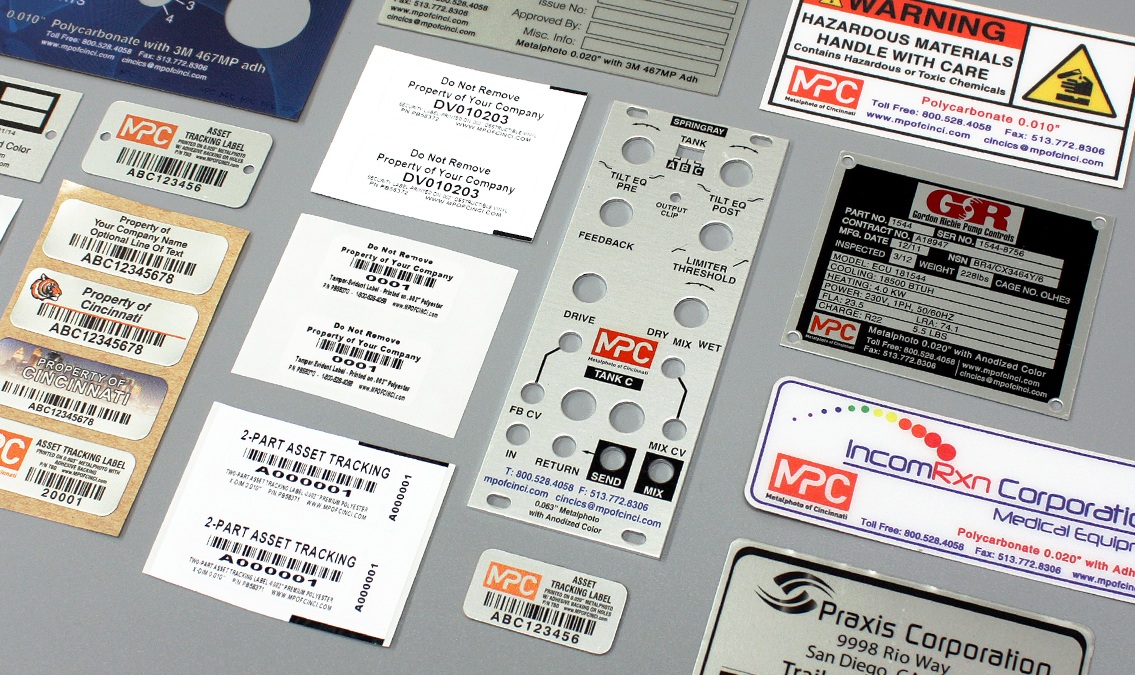
Digital logs also work better with MPC metal equipment labels that include QR codes or asset numbers. Workers can scan these identifiers to pull up the correct checklist instantly. The system tracks who completed each inspection and when, which improves accountability.
Your data stays organized and searchable in digital format. You can analyze patterns, spot recurring problems, and make smarter decisions about equipment management.
3) Predictive Maintenance Systems
When you properly identify your equipment, you can set up predictive maintenance systems that catch problems before they happen. These systems use sensors on your machinery to track things like temperature, vibration, and oil quality. The data goes to software that spots patterns indicating potential failures.
You’ll reduce downtime by addressing issues early. Instead of waiting for a machine to break down in the middle of a job, you get alerts when components need attention. This helps you schedule repairs during off-hours or slower periods.
Your maintenance costs go down because you’re not doing unnecessary routine work or paying for emergency repairs. The systems tell you exactly what needs fixing and when.
Better equipment identification makes all this possible. You need to know which machine is sending which data. Without accurate identification, you can’t track maintenance history or match sensor readings to specific equipment. This wastes the benefits of predictive technology.
The software learns your equipment’s normal operating patterns over time. It gets better at predicting failures as it collects more data from your identified machines.
4) Smartphone Apps for Asset Scanning
Smartphone apps have transformed how you track construction assets on job sites. These apps let you scan barcodes on equipment and tools using your phone’s camera. You can instantly see where items are located and check their status without walking around the site with a clipboard.
The scanning process is simple. You enter basic tool information and assign it to a specific job site. Then you scan the barcode whenever equipment moves between locations. This creates a digital record that updates in real time.
Many apps support both pre-printed barcodes and labels you can print directly from mobile devices. You can track when workers check out equipment and when they return it. This helps you enforce maintenance schedules and prevent tool loss.
The apps work on standard smartphones, so you don’t need to buy special scanning equipment. Your team can use devices they already carry. This makes it easy to get everyone tracking assets the same way across multiple job sites.
5) Cloud-Based Equipment Management Platforms
Cloud-based platforms give you real-time visibility into all your construction equipment from any location. You can track asset locations, monitor usage patterns, and schedule maintenance through a single centralized system.
These platforms connect your field teams, office staff, and maintenance crews on one unified system. Everyone accesses the same up-to-date information about equipment availability and status. This reduces confusion and prevents double-booking of machinery.
You gain better control over mixed fleets that include both powered and non-powered assets. The software tracks everything from heavy machinery to smaller tools without requiring separate systems.
Cloud platforms typically include mobile apps that let field workers update equipment status instantly. Your team can check in and out equipment, report issues, and request maintenance right from the job site.
The data security features built into these systems protect your equipment information while allowing authorized users to access what they need. You can customize permission levels based on job roles and responsibilities.
Integration capabilities let you connect equipment management with your other construction software. This creates a complete operational view across all your projects and locations.
How Equipment Identification Streamlines Operations
Proper equipment identification creates a clear system for tracking and managing construction assets. This reduces confusion on job sites and helps teams work faster with fewer errors.
Reducing Equipment Mix-Ups
Equipment mix-ups waste valuable time and create safety risks on construction sites. When workers can’t quickly identify the right tools or machinery, they may grab the wrong equipment for a task. This leads to work stoppages and potential damage to both the equipment and the project.
A clear identification system solves this problem. You can use color-coded labels, barcode systems, or RFID tags to mark each piece of equipment. These markers show key details like equipment type, maintenance status, and authorized operators.
When your team knows exactly which excavator, generator, or power tool they need, they spend less time searching and more time working. Visual identification methods help workers make quick decisions without consulting multiple lists or asking supervisors. This is especially important on large sites where dozens of similar machines operate simultaneously.
Improving Inventory Management
Accurate equipment tracking gives you real-time visibility into your inventory. You know what equipment you have, where it’s located, and who’s using it. This information prevents you from renting or buying equipment you already own but can’t locate.
Digital tracking systems linked to equipment identifiers let you monitor usage patterns. You can see which machines sit idle and which ones your crews use constantly. This data helps you make smarter decisions about equipment allocation across multiple job sites.
Your inventory records stay current when workers scan equipment IDs during check-in and check-out. This reduces manual paperwork and human error in record-keeping.
Minimizing Downtime
Equipment downtime costs you money and delays projects. A solid identification system connects each machine to its maintenance history and schedule. You can track service intervals, past repairs, and upcoming maintenance needs.
When maintenance teams scan an equipment ID, they immediately access repair records and parts lists. This speeds up diagnostics and reduces the time needed to fix problems. You can also schedule preventive maintenance based on actual usage data rather than guesswork.
Equipment identification helps you respond faster when problems occur. Workers can report issues by referencing specific equipment IDs, so repair teams arrive prepared with the right tools and parts.
Technologies Enhancing Equipment Identification
Modern tracking systems use wireless signals and scannable codes to monitor construction equipment in real time. These technologies cut down on lost equipment and reduce time spent searching for tools.
Radio-Frequency Identification (RFID) Systems
RFID technology uses small tags attached to equipment that send signals to nearby readers. Each tag contains a unique identification number that links to a database with details about the equipment.
You can track multiple pieces of equipment at once without needing a direct line of sight. The readers pick up signals from tags within range, which means you don’t need to scan each item individually. This saves time during equipment checks.
Key benefits of RFID systems include:
- Automatic tracking when equipment enters or exits a job site
- Real-time location data for valuable tools and machinery
- Reduced theft through instant alerts for unauthorized movement
- Fast inventory counts that take minutes instead of hours
The tags come in two types: active and passive. Active tags have their own power source and work from longer distances. Passive tags are cheaper and get power from the reader’s signal, but they work at shorter ranges.
Barcode and QR Code Applications
Barcodes and QR codes offer a simple way to identify equipment using printed labels. You scan these codes with a smartphone or handheld scanner to access equipment information instantly.
QR codes hold more data than traditional barcodes. They can store equipment specifications, maintenance history, and safety instructions. Workers scan the code and see all relevant information on their mobile device.
This system works well when you need basic tracking without major infrastructure costs. You print labels on durable materials that stick to equipment surfaces. The codes link to your management software where you update equipment status and location.
Common uses include:
- Daily equipment check-in and check-out procedures
- Maintenance scheduling and service record updates
- Operator certification verification
- Damage reporting with photo uploads
The main limitation is that workers must manually scan each item. This takes more time than RFID but costs significantly less to set up.