
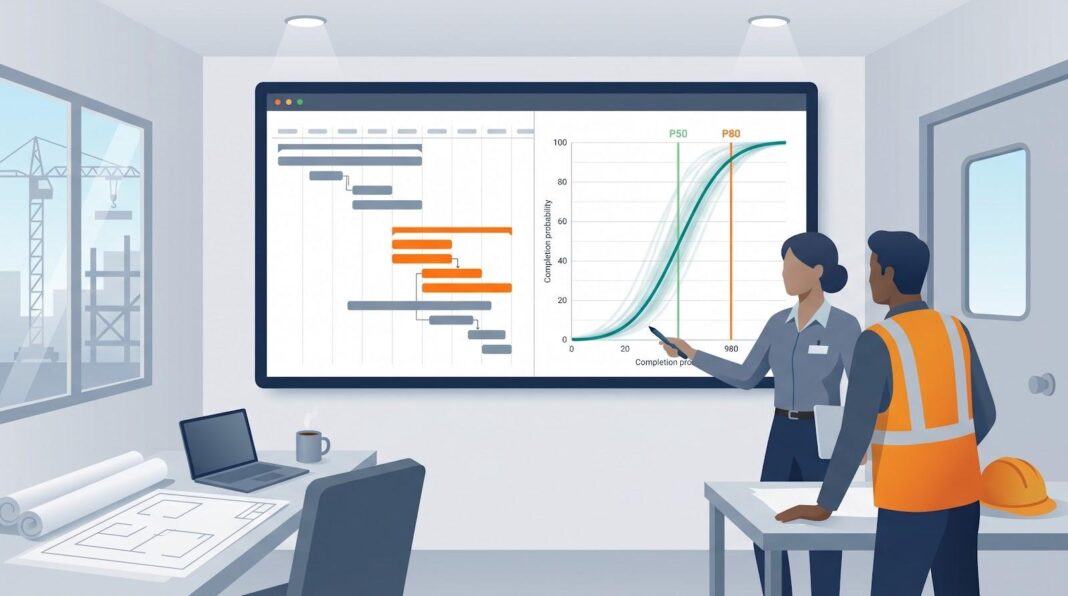
Construction schedules slip and budgets swell. Traditional CPM tools lock in a single finish date and hope reality cooperates. The U.S. Government Accountability Office warns that credible plans must run Monte Carlo simulations to surface a range of outcomes and set realistic contingency. Modern schedule-risk platforms meet that bar. They connect to Primavera, Microsoft Project, or their own engines, spin through thousands of iterations, and return an S-curve that shows exactly how confident you can be. We reviewed every option we could find, cut the fluff, and ranked the nine tools that matter for builders in 2026.
How we selected and evaluated the software
We started the same way you do when a deadline is breathing down your neck: we opened the schedule and checked the logic. This time, the “schedule” was every guide, review, and forum thread we could find on schedule-risk tools. We mapped the gaps, removed the fluff, and kept only firsthand insight.
Next, we lined up six criteria that matter on real construction sites: depth of Monte Carlo simulation, integration with CPM platforms, construction-specific features, ease of use, collaboration options, and overall value. Each one carried a weight, so the scoring mirrors the trade-offs you face when balancing price, learning curve, and analytic horsepower.
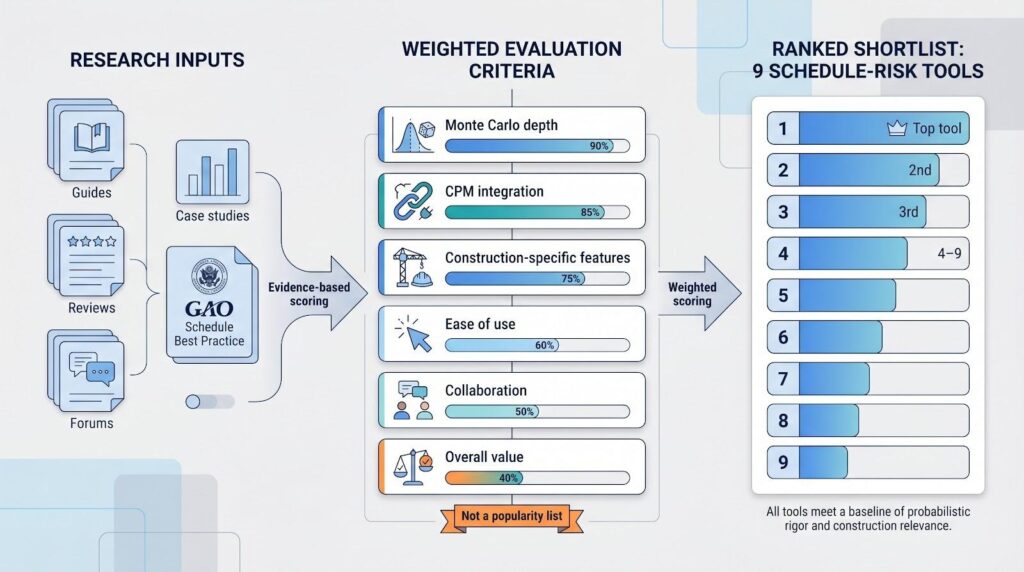
Numbers alone are not enough. We pressure-tested vendor claims against government best practice, notably the GAO’s call for Monte Carlo and risk-driver methods in credible schedules. We also cross-checked user sentiment on professional forums and pulled statistics from public case studies. If a feature or price point lacked a verifiable source, it did not earn points.
Finally, we converted the raw scores into a clear comparison table you will see later. The ranking is transparent: the tool with the highest weighted total sits at number one, but every entry clears the same baseline of probabilistic rigor and construction relevance.
In short, you are not getting a popularity list. You are getting a field-tested short list built on repeatable criteria, clear weights, and evidence you can audit.
Trends shaping schedule-risk analysis in 2026
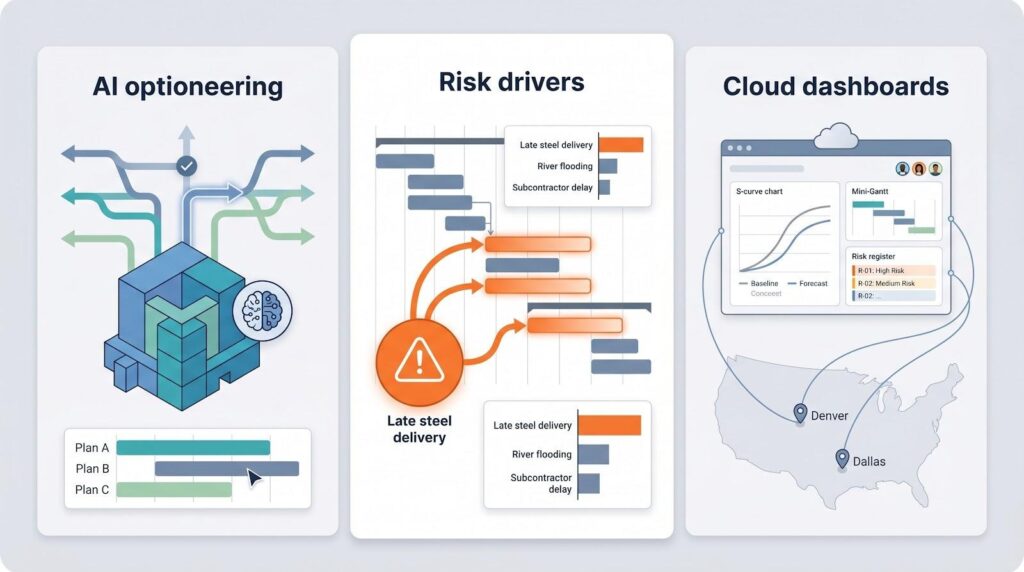
Walk any job trailer today and you will hear the same terms that once stayed inside conference decks: AI copilot, risk drivers, cloud dashboards. None of them are hype anymore. They are reshaping how we build and, more critically, how we predict finish dates.
The first big shift is artificial intelligence. Tools like ALICE create thousands of construction sequences in minutes, surfacing options that cut weeks without changing Monte Carlo inputs. AI does not replace probabilistic analysis. Instead, it feeds the simulator a smarter baseline, so your P-value starts closer to reality.
Methodology is evolving too. Slapping three-point ranges on every activity is fading. The industry now favors risk-driver models that link one discrete threat, such as “late steel delivery,” to each task it touches. This captures correlation that simple ranging misses and matches the GAO’s best-practice call for realistic risk linkage.
Cloud deployment rounds out the trio of major shifts. Legacy desktop apps still work for a solo analyst, but they struggle in a hybrid worksite. Modern platforms stream schedules, risk registers, and dashboards to anyone with a browser, so estimators in Dallas and field engineers in Denver can refine the same model before tomorrow’s 8 am risk review.
Together, AI planning, driver-based modeling, and cloud collaboration are moving schedule risk from an annual compliance box to a living management routine. The nine tools we rank next show how far each vendor has embraced this new normal.
1. InEight Schedule – construction planning + risk in one workspace
InEight puts risk analysis at the core, not as a bolt-on. Its AI-powered construction scheduling engine builds the CPM schedule in the same cloud workspace where you run Monte Carlo, so logic stays intact and data never drifts, while collaborative markup captures field feedback without extra exports. That alone saves hours of export-import churn each month.
The risk engine speaks the language field teams know: discrete events such as “late permit” or “rainy season” sit in a register and automatically touch every affected task. One click runs thousands of iterations, then drops the results back into the Gantt as P50 and P80 bars you can show the superintendent without opening another app.
Because cost modules share the same database, time risk flows straight into projected spend. Executives see a single dashboard that answers both “When?” and “How much?” No spreadsheet gymnastics required.
User feedback mirrors that simplicity. Planners appreciate the modern interface, while field crews rely on short-interval planning that surfaces real-world blockers the simulator already tracks. Pricing lands in the enterprise range, but heavy civil contractors report the license pays for itself when a single avoided week of delay covers the fee twice.
If you need one home for schedule, cost, and risk, especially on complex infrastructure jobs, InEight Schedule is the benchmark.
2. Oracle Primavera Risk Analysis: the veteran with fresh cloud legs
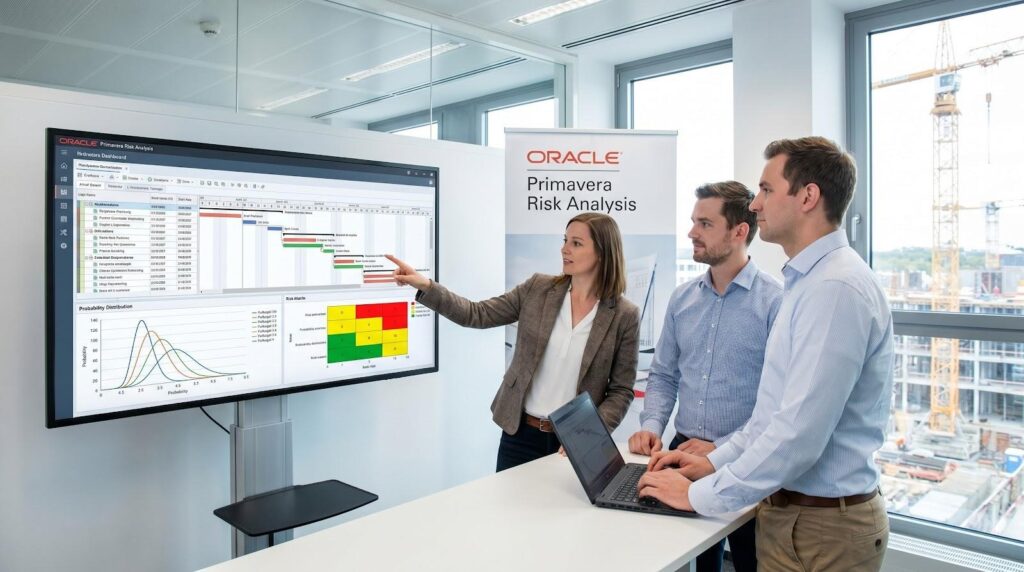
Oracle Primavera Risk Analysis and Primavera Cloud Risk interface screenshot
Oracle’s Pertmaster roots mean most schedulers have tried Primavera Risk Analysis at least once. The desktop edition still offers a deep toolkit: three-point ranges, discrete events, branch logic, and a sensitivity tornado auditors appreciate. Plug it into a P6 file and you can launch a full Monte Carlo run before the coffee cools.
The interface is powerful yet dated, so Oracle released Primavera Cloud Risk. It keeps the same simulation engine inside a cleaner web shell that sits beside portfolio dashboards and resource planning. Update the schedule in the cloud, run risk in the same tab, and share an S-curve link with the owner instead of a PDF email chain.
Oracle stays strong on integration. Finish a run and push contingencies back into the baseline or spin up side-by-side scenarios for claims analysis. The platform also models weather factors, a plus for civil jobs dealing with hurricane season.
Pricing lands at the top of the market, and long-time users note the desktop tool has not seen major UX updates in years. The cloud route is the future, but it requires a broader Primavera Cloud subscription, which not every P6 shop has budgeted.
Choose Oracle if your organisation already depends on the Primavera ecosystem and you need a risk engine executives recognise. It is a reliable workhorse that keeps getting cloud tune-ups to stay in the race.
3. Deltek Acumen Risk: analytics-driven and schedule-smart
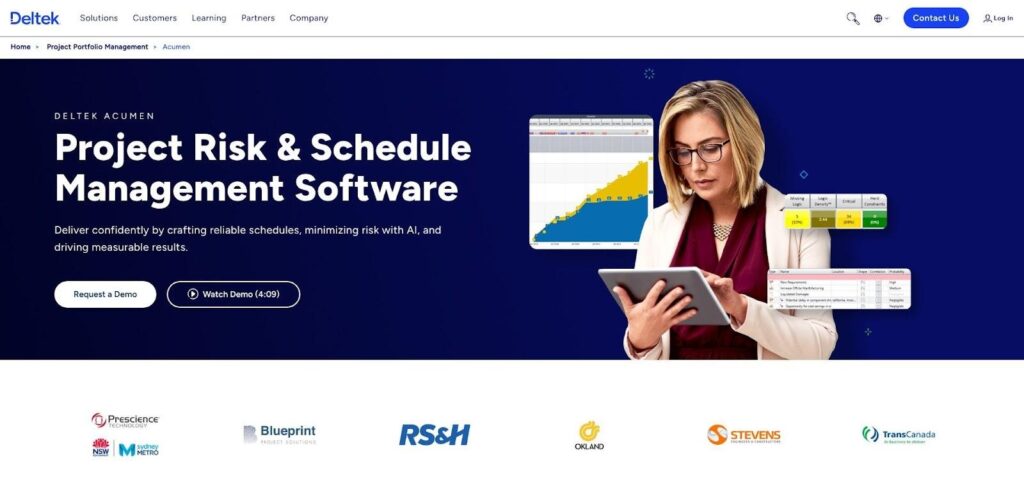
Deltek Acumen Risk schedule health and Monte Carlo analysis screenshot
Acumen stands on two legs: Fuse for schedule health and Risk for simulation. First, Fuse scans your P6 or Microsoft Project file for broken logic and flags every dangling predecessor. Clean that up, then slide the schedule into Acumen Risk with one click and run Monte Carlo on a solid baseline.
Risk modelling follows the driver method. Instead of sprinkling ranges everywhere, you link one risk, such as “concrete shortage,” to every slab, column, and wall it affects. The simulator reads those links, respects correlation, and produces a clear tornado chart ranking the worst offenders.
Speed is a selling point. Users report crunching 5,000-activity schedules in seconds, handy when an owner wants a fresh P-80 date before lunch. Reports arrive as executive-ready PDFs, and cloud sharing lets regional teams review scenarios without installing desktop software.
Pricing matches enterprise expectations, but buyers get more than raw simulation. They receive a full QA and risk pipeline that firms such as Blueprint Project Solutions use to replace aging tools like Oracle PRA. If your mantra is “a bad schedule makes bad risk,” Acumen Risk is an ally.
4. Safran Risk: built around risk drivers and real-world weather
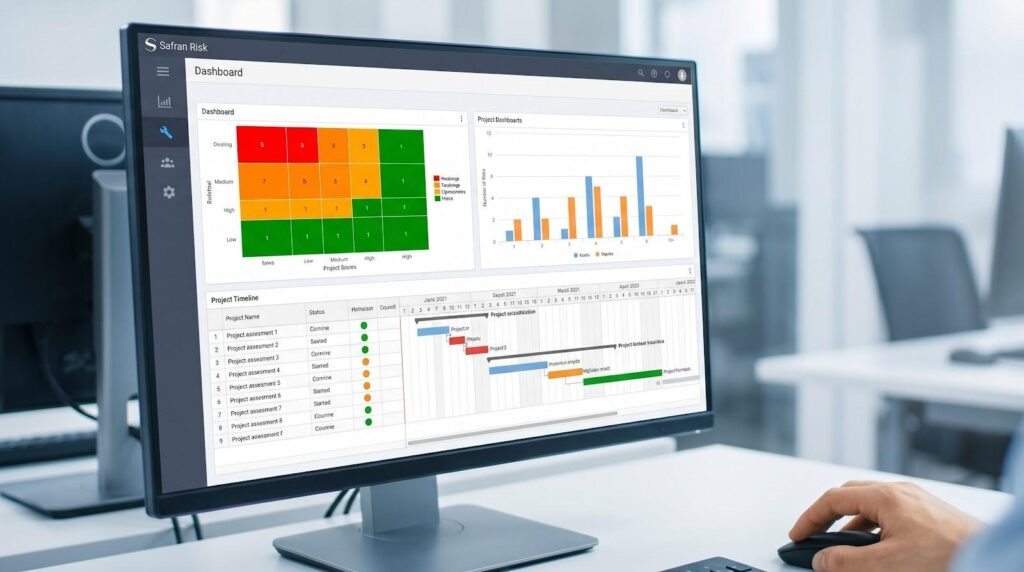
Safran Risk driver-based and weather-aware schedule risk analysis screenshot
Safran started with a blank sheet and coded the risk-driver method the GAO praises, so correlation is built in from the first click. Instead of adding ranges to every task, you define a discrete threat such as “river flooding,” assign it a probability curve, and attach it to each pile-cap and cofferdam it might affect. One source of truth, many impacts, realistic results.
The engine stays quick on large models. Users have simulated schedules with 20,000 activities and seen only modest slowdowns, which is why mega-projects like London’s Crossrail relied on it. Add the optional weather module that pulls historical rain data by latitude, and civil planners can finally measure how monsoon season eats float.
Safran runs as a desktop powerhouse with a companion web portal for reviews and what-if sharing. That mix keeps analysts productive while letting executives open a live dashboard on a tablet during site walks.
Licensing costs sit near the top of the market, and North American support is improving but still smaller than Oracle’s network. Even so, on billion-dollar tunnels or LNG plants with tightly coupled risks, Safran’s accuracy and scale make the spend worthwhile.
5. Spider Project: a power-user’s all-in-one scheduler
Spider Project rewrites the usual playbook. Instead of bolting risk onto Primavera or MSP, it bundles CPM scheduling, resource optimisation, and Monte Carlo simulation inside one desktop suite. The benefit is clear: the moment you tweak a calendar or crew allocation, the risk profile updates with zero imports or broken links.
Risk entry stays simple. Add optimistic, most-likely, and pessimistic durations, tick a box for “generate buffers,” and Spider runs iterations that show both finish-date probability and suggested schedule buffers. Veterans enjoy the extra features, such as probabilistic calendars, conditional branching, and resource-critical path analysis that feeds straight into the simulation.
The tool proved its muscle on mega-projects like the Sochi Olympics, yet the price sits closer to mid-tier competitors than to Oracle or Safran. The catch is the interface. It feels utilitarian, and English-language training material is thinner than Western rivals. Teams willing to invest in learning curves gain impressive depth; casual users may bounce.
Spider suits organisations ready to adopt a unified scheduling environment and comfortable trading polish for raw capability. If you crave granular control and dislike data handoffs, this spider is worth bringing into the web.
6. ALICE Technologies: AI optioneering that shrinks risk upstream
ALICE flips the script. Instead of modelling uncertainty on a fixed schedule, it uses generative algorithms to create thousands of schedules and highlights the ones least likely to slip. Think of it as a pre-risk tool: provide your BIM model, crew libraries, and constraints, then watch it explore sequencing options no human has time to draft.
While ALICE does not run classical Monte Carlo, its scenario engine acts like a risk lens. Dial productivity down ten percent or block weekend work, regenerate plans, and instantly see which sequence keeps float and which unravels. Users report cutting data-center baseline schedules by forty percent after running these what-ifs.
Outputs are visual. A 4D animation shows crews moving through the project, so superintendents catch congestion before it becomes a change order. Results export to Primavera or MS Project, where you can still run a Monte Carlo if the contract demands a P-value.
The catch is input detail and cost. ALICE needs granular data and carries enterprise SaaS pricing. It excels in early design and bid phases when shifting the work plan is still cheap. Bring it in after groundbreak and the value falls.
Use ALICE when you want to de-risk by design, not just simulate delays after they appear.
7. Barbecana Full Monte: Monte Carlo inside Microsoft Project
Full Monte lives where many schedulers already spend their day: the MS Project ribbon. Install the add-in and a new tab appears that lets you set three-point ranges, pick a distribution, and launch a simulation without exporting a single XML.
Results slide back into the familiar Gantt. Bars turn green for P50, blue for P80, red for high-risk float burners. A quick tornado ranks the activities that drive finish variance, and a Latin Hypercube option speeds large runs so your laptop fan stays quiet.
Because Full Monte is small and focused, the learning curve is shallow. Consultants enjoy it for bid reviews and claim preparation; open the owner’s schedule, add uncertainty, and generate evidence in under an hour. Pricing is equally light, a fraction of enterprise tools, and the perpetual licence avoids annual renewals.
Limitations exist. You model each task separately, so there is no central risk register, and cost risk is indirect unless you link cost to duration fields. Large P6 users must still round-trip through MS Project, which adds a step.
Even with those caveats, Full Monte is the quickest way to add real Monte Carlo to a deterministic MS Project plan, making it a go-to for mid-sized contractors and solo schedulers.
8. @RISK Schedule: flexible Monte Carlo for Excel power users
If Excel is your second language, @RISK feels like home. The add-in turns every cell into a stochastic playground. Import a Primavera or MS Project schedule, and tasks become rows with duration formulas powered by @RISK’s deep distribution library—beta-PERT, lognormal, custom curves, and more.
This freedom shines when you need to blend schedule, cost, and finance in one workbook. Want to link delay days to liquidated damages and overhead burn? Point a formula at the finish-date cell, run ten thousand iterations, and walk away with joint histograms that show both time and dollars at risk.
The trade-off is labour. Building a schedule network in Excel takes effort, and very large projects can strain workbook size. Visuals are chart based, not Gantt, so stakeholders unfamiliar with spreadsheets may tune out. Still, risk analysts value the control: correlations, scenario switches, and sensitivity graphs sit at their fingertips.
Pricing lands mid-pack, and many firms already licence @RISK for cost modelling, so extending to schedule can be a budget-friendly two-for-one. Use it when your risk story reaches beyond time and you are comfortable living in cells rather than CPM bars.
9. Intaver RiskyProject: budget-friendly Monte Carlo for everyday use
RiskyProject plays the role of scrappy all-rounder. Open the desktop app and you see a full Gantt view, a risk register, and Monte Carlo controls in one clean ribbon. Import a P6 or MSP file, or build a quick schedule from scratch, then assign risks with probabilities and impacts in plain language.
Run the simulation and RiskyProject returns a success-rate curve, criticality index, and cost histogram if you loaded financials. Built-in Event Chain Methodology lets you model how one risk triggers another, capturing knock-on effects that simple ranges miss.
The standout feature is price. A perpetual licence lands around the cost of one monthly seat of an enterprise tool, which makes quantitative risk accessible to regional contractors and solo consultants who once relied on gut feel. Reviews praise the logical layout, even if the aesthetic feels early 2010s.
You will not find weather libraries or AI sequence generators here, and mega-schedules can slow down. Yet for most real-world projects that need defensible P-dates and a ranked risk list, RiskyProject delivers without drama or debt.
Feature snapshot: how the nine tools stack up
Numbers tell the story faster than prose. The table below condenses the traits most construction planners care about: integration path, risk method, cost-risk capability, preferred deployment, and the single standout strength we noted in testing.
| Software | Schedule integration | Risk modelling | Cost risk | Deployment | Unique edge |
| InEight Schedule | Native CPM + P6/MSP import | 3-point + risk register | Yes | Cloud SaaS | Unified schedule-cost-risk workspace |
| Primavera Risk | P6 / Primavera Cloud | 3-point + events | Yes | Desktop & Cloud | Long-time industry standard |
| Acumen Risk | P6/MSP via Fuse | Driver-based | Yes | Desktop & Cloud | Built-in schedule health scoring |
| Safran Risk | P6/MSP & Safran Project | Driver-based + weather | Yes | Desktop & Web | Correlated weather simulation |
| Spider Project | Native CPM tool | 3-point + buffers | Yes | Desktop | All-in-one scheduling and risk |
| ALICE | BIM/P6 import | AI scenarios | Indirect | Cloud | Creates better plans upstream |
| Full Monte | MS Project / P6 plugin | 3-point + LHS | No | Desktop add-in | Fastest MS Project risk overlay |
| @RISK Schedule | Excel import from P6/MSP | Any distribution in Excel | Yes | Excel add-in | Unlimited custom modelling |
| RiskyProject | MSP/P6 import or native | 3-point + events | Yes | Desktop | Entry-level price, full QSRA set |
Use the grid as a filtering lens. If cloud collaboration tops your list, InEight or Safran rise to the surface. Need Excel freedom? @RISK wins. Want pure speed inside MS Project? Full Monte answers. The right fit becomes clear once your must-haves line up with each column.
Buying considerations and tips
Start with the tools you already use. If your schedules live in Microsoft Project, a lightweight plugin such as Full Monte or RiskyProject keeps adoption friction low. Primavera shops can turn to Oracle or Acumen for native integration, while Safran bridges via XER import when deeper analytics are needed.
Match complexity to project scale. A $5 million tenant fit-out rarely needs weather-driven risk drivers; a $5 billion rail corridor certainly does. Enterprise suites shine on megaprojects, but their licence costs and training curves can overwhelm smaller teams.
Gauge internal skills. Monte Carlo is not push-button magic. Someone must set realistic ranges, vet correlations, and read tornado charts. If you lack a dedicated risk analyst, favour tools with guided wizards and clear visual reports, such as InEight, RiskyProject, and Full Monte.
Budget beyond the sticker price. Factor in annual maintenance, required host software, and the hours your team will spend learning the interface. A cheaper licence that consumes staff time can cost more than a premium tool that fits your workflow on day one.
Finally, test-drive. Most vendors provide trials or sandbox demos. Load a live schedule, run a quick simulation, and review outputs with the team. Real data under deadline pressure reveals more than any brochure ever will.
Frequently asked questions
Do I need a dedicated risk analyst, or can my scheduler run the sims?
A seasoned scheduler with good training can handle entry-level tools like RiskyProject or Full Monte. Once you move to driver-based modelling or integrated cost-schedule risk, the inputs and outputs become dense. At that point, a full-time analyst pays for itself by catching unrealistic ranges and explaining tornado charts to leadership.
How many iterations are enough for a Monte Carlo?
Aim for at least 5,000. Most modern engines converge by that point, and Latin Hypercube samplers in Full Monte or @RISK often stabilise even faster. Run the same count every reporting cycle so trends stay comparable.
Can these tools model weather delays?
Safran does it natively, pulling historical rainfall or temperature data by location. InEight and RiskyProject let you create a discrete “weather risk” event and tie it to affected tasks. For the rest, adjust calendars or elongate winter activities; even a simple proxy is better than ignoring weather.
Our contract demands a P80 date. Which output do I send?
Export the S-curve or finish-date histogram and highlight the 80-percent percentile. Most tools label it clearly; if not, check the cumulative distribution table. Pair the graphic with a short note: “We have an 80-percent confidence of finishing by 14 July 2027.”
How often should we rerun the analysis?
Run at baseline, major re-forecasts, and at least quarterly on long jobs. Risk exposure drifts as design freezes or crews ramp up, so a stale simulation is almost as bad as none. Cloud tools make reruns painless; set a calendar reminder and stick to it.
Will Monte Carlo slow approvals by scaring executives?
The opposite, when done right. A clear P-curve shows that your dates rest on evidence, not hope. The first run may reveal hard truths, but once contingency is set, later updates often build confidence because surprises surface early, not in the final stretch.
Conclusion
Construction teams now have a spectrum of schedule-risk tools that pair Monte Carlo horsepower with features tailored to field realities. Use the comparison grid, buying tips, and FAQs above to match your risk appetite, budget, and existing tech stack with the software that will keep your projects on time and on budget.